Application guide by addaScanCompare the inspection task, imaging conditions and validation steps with your own production line.
- Task
- Kit packing: count, orientation and identity
- Decision focus
- Assembly verification
- Workflow
- Load expected identities and positions.
- Validation
- Correct kits with normal positional variation
A complete count can still contain the wrong kit
Original explanatory diagrams show the product states and inspection questions. They are schematics, not captured inspection results.
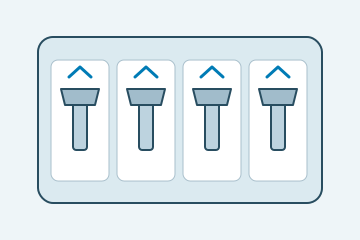
Count, identity and orientation match the recipe.
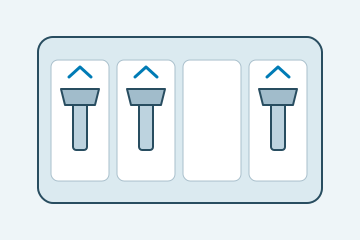
An expected position is empty.
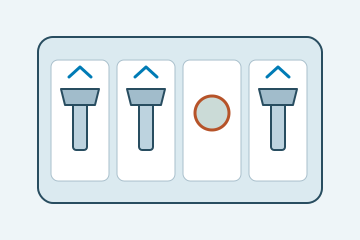
The count is correct but a component differs.
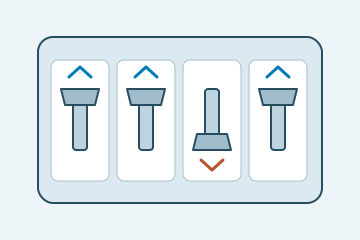
The required component faces the wrong way.
Select an image to view it at full size.
Verify the kit's parts, not just its total count
Explore Assembly verification and Presence and counting inspection to connect this inspection task with the wider station requirements.
Swipe across the table to compare all columns →
| Decision | Evidence to use | Rule to agree |
|---|---|---|
| Contents complete | Check required positions or object counts. | Do not let a duplicate hide a missing item. |
| Items correct | Use distinguishing features or identifiers. | Hold indistinguishable or obscured cases. |
| Orientation correct | Check a visible directional feature. | Verify the selected view can expose it. |
Decide when appearance can establish identity
Locate the kit tray or compartment map and evaluate occupancy separately from identity. Use shape, colour or printed features only where they reliably distinguish the required part. If two components are visually identical at the available view, add a readable identifier or a controlled upstream binding step rather than training a model to guess their identity.
A fixed-layout kit can suit region-based checks. Flexible layouts may benefit from detection and association, but need rules for overlapping parts and ambiguous assignments. Orientation is another independent requirement: a recognised component can still face the wrong way for assembly or presentation.
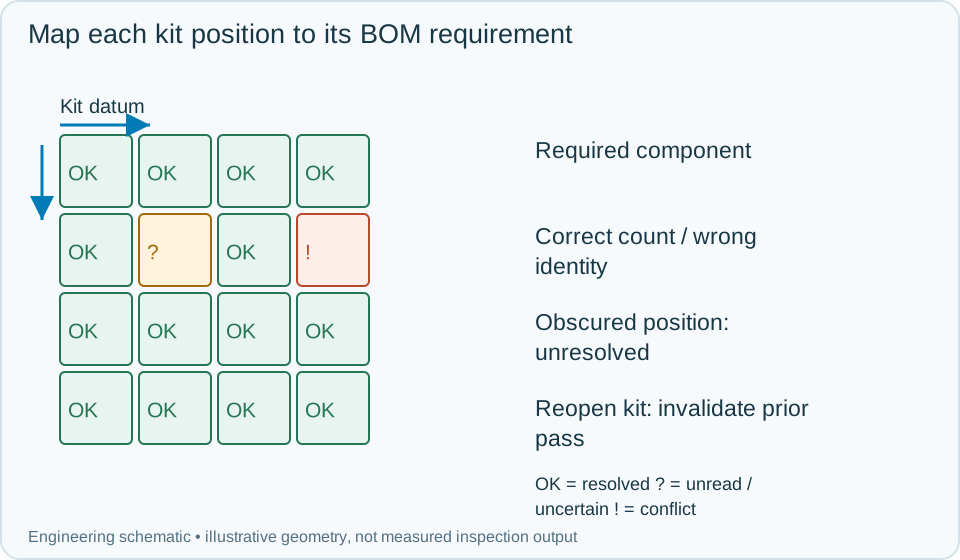
On a small screen, scroll across the diagram to inspect the labels.
Swipe across the table to compare all columns →
| Approach | Useful when | What to validate |
|---|---|---|
| Fixed pocket inspection | Positions and views are repeatable. | Test tray and item tolerances. |
| Learned object classification | Appearance varies but relevant features remain visible. | Validate unseen good variation and close substitutes. |
| Identifier-based checks | Similar items need explicit identity. | Compare reads with the kit recipe. |
Worked example: the count is correct but one component is a substitute
In an illustrative kit, every compartment is occupied and the total matches the bill of materials. One part has the outline of the expected item but a distinguishing label indicates another variant. The kit fails identity even though occupancy passes.
Another correct component is reversed and fails its orientation rule. An obscured item remains unverified rather than being inferred from the expected list. Hold the kit for rework and preserve the position-level results. When the kit is reopened, invalidate the prior completion state and perform the required reinspection after correction. A stale pass from before the kit was opened must not release the changed contents. Store the kit identity, recipe version, component evidence and final closure or handling confirmation.
Swipe across the table to compare all columns →
| Observed evidence | Inspection decision | Action and retained record |
|---|---|---|
| Every position is occupied but one visible identifier belongs to a substitute component. | Kit identity fails although the count is correct. | Retain the position and distinguishing feature, hold for rework and repeat all checks required after the kit contents are changed. |
| The correct component is reversed or partly hidden in its compartment. | Orientation fails or identity remains unresolved, respectively. | Keep these reasons separate in the position record and require correction or restored visibility before kit completion. |
| A previously accepted kit is opened and a part is replaced. | Earlier completion no longer covers the current contents. | Invalidate the prior release state, preserve the replacement history and perform the required reinspection before confirming final closure. |
When should a complete-looking kit be held?
- 01Select the kit recipeLoad expected identities and positions.
- 02Expose the contentsInspect before closure hides the features.
- 03Check independent requirementsEvaluate completeness, identity and orientation.
- 04Release or recheckKeep rework linked to the same kit.
Keep the image decision associated with the kit identity and current order. Define how the pack is released to closing, how an operator corrects a fault and how the corrected kit is rechecked. A previous pass should not survive reopening or a recipe change unless the process explicitly maintains the same verified state.
Challenge similar parts and rework transitions
Use visually similar substitutes, reversed parts, overlapping items and missing components at difficult positions. Test reopening a passed kit and changing the bill of materials during a pending event.
Keep a position-to-requirement record that an operator can understand. If the image cannot distinguish the relevant variant, document the additional identifier or process evidence needed; a broad object-class match is not sufficient proof of kit correctness.
Swipe across the table to compare all columns →
| Challenge | What the trial should establish |
|---|---|
| Correct kits with normal positional variation | Measure false rejects. |
| Missing item plus an extra different item | Show that count alone cannot pass the kit. |
| Similar substitution and reversed component | Validate identity and direction. |
| Rework, reopening and changeover | Ensure release requires the correct current inspection. |
Why the correct count does not prove the correct contents
Visible identity checks do not prove the internal function or contents of sealed components. If two parts are visually indistinguishable, use a suitable identifier, upstream traceability or another test. Do not claim that a trained model can reliably distinguish a feature that the camera cannot see.
Use Vision measurement vs CMM and gauges to develop the related acceptance and integration questions for your trial.
Kit contents, substitutes and packing rules
Provide the bill of materials, all kit variants, similar wrong items, reversed parts, packaging obstructions, rework procedure and the order-to-recipe interface.
Use the optical and recovery challenges above when applying the architecture choices in HIKROBOT and other vision solutions comparison.
Scope and budget
Review item presentation, identity cues and packing controls in the assembly verification scope and cost factors.
Testing and handover
Use the testing and handover process to challenge a correct count containing a substituted item, a rotated component and an incomplete kit.