Application guide by addaScanCompare the inspection task, imaging conditions and validation steps with your own production line.
- Product
- High-temperature labels for SMT production
- Inspection point
- After printing, before release for use
- Checks
- Print condition, expected content and serial identity
- Control focus
- Hold failed labels and verify replacements
One label, four very different decisions
In this example, the next expected serial is A1042 and A1041 has already been released. A clear-looking label is not enough to decide whether it can be used.
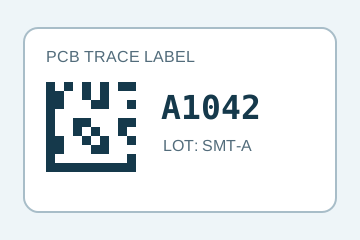
A1042 matches the job. Release still depends on the print checks and uniqueness rule.
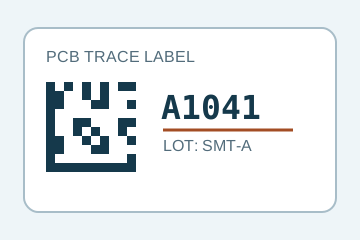
Readable print, wrong identity. Check the release history, not just the image.
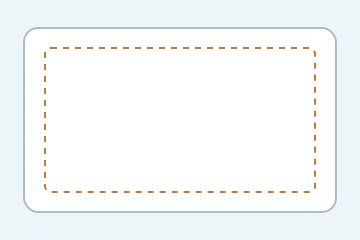
The label is present, but the required printed content is absent.
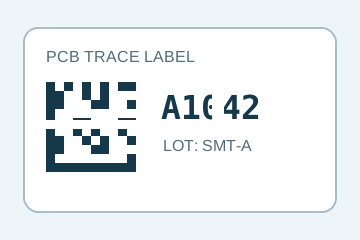
Missing strokes need a print-condition decision even when a reader can recover the code.
Select an image to view it at full size.
Start with the print job, not just the camera
The inspection point sits between the label printer and the release of labels to production. A job supplies the approved label layout, product or batch fields and the serials to print. The station then checks each physical label against that reference. This links label verification to the identity of the product the label will eventually accompany.
The diagrams above are original explanatory drawings with illustrative serials and non-encoded code patterns. They show the decisions to make; they are not captured inspection results.
A blank label and a missing label are different events. The blank label can appear in an image. A missing label, missed trigger or skipped serial may leave no useful image at all. Reconcile the print-job records with label-position events and inspection results so an absent event cannot silently disappear.
Separate printing, content and uniqueness
Swipe across the table to compare all columns →
| Question | Evidence to use | Action to define |
|---|---|---|
| Is the print complete? | The required text and code regions, checked for missing or damaged print. | Hold an absent, unreadable or unacceptable print. |
| Does the content match? | Decoded data and OCR/OCV compared with the current job reference. | Hold a readable but wrong serial, product or batch. |
| Has this serial been released already? | The stored serial history within the agreed uniqueness scope. | Block a second release unless an authorised replacement process applies. |
| Is an expected label or result missing? | Print queue, label positions, triggers and completed results reconciled together. | Stop or quarantine the uncertain sequence for reconciliation. |
OCR reads characters; OCV checks the print against expected content. A code reader decodes a symbol. None of those functions alone establishes that a serial has not already been used. The uniqueness rule belongs in a persistent job or traceability record. The OCR and OCV inspection guide explains the difference between reading and verification.
Close the loop without releasing a duplicate
- 01Print from the jobReserve the intended serial and identify the physical label position.
- 02Inspect and compareCheck the print and content; return a result for that label.
- 03Release or holdRecord an accepted release, or keep the failed label out of use.
- 04Verify the replacementAccount for the failed label, then inspect the authorised reprint.
For example, if A1042 has a print fault, mark its attempt as failed and confirm that the physical label has been removed or made unusable. If the job rules permit reusing that serial, create a linked replacement attempt for A1042. Its earlier failed attempt is not an accepted duplicate; a second accepted release would be. Do not simply increment the serial and leave the gap unresolved.
A camera result is not confirmation that a reject action happened. If removal, invalidation or the result message is uncertain, hold the affected labels. Keep the job ID, serial, attempt, image, failure reason and final disposition together. After a restart, restore those states before releasing more labels. Define the handshake and failure behaviour with the PLC and reject integration requirements.
Which inspection approach fits this station?
Swipe across the table to compare all columns →
| Approach | Useful when | What it still needs |
|---|---|---|
| Fixed code reader + job controller | The key decision is readable code data matched to an expected record. | Separate checks if visible text, layout or print defects also matter. |
| Smart camera + job controller | Text, code and visible print regions fit a repeatable camera view. | Verified tool support, sufficient image detail and persistent serial-history logic. |
| Industrial camera + PC vision | Several lanes, layouts or inspection views require coordinated processing. | Camera synchronisation, software support and controlled recipe changes. |
For a HIKROBOT approach, use the smart camera selection guide to check the exact model and software tools against these requirements. A camera specification does not establish printer control, automatic reprinting or MES integration. Include those functions explicitly in the station scope. Compare alternatives using the same label samples and exception cases in the HIKROBOT and other vision solutions comparison.
Make small printed features visible
Use the smallest required character and code feature to set the image-detail requirement. Then check label skew, ribbon streaks, glossy surfaces and the normal range of print contrast. For moving label stock, coordinate exposure, illumination and the trigger so the complete label is captured without motion blur. Continuous web movement and stop-start printing may need different acquisition strategies.
Keep the inspection recipe tied to the print job. At changeover, confirm the expected fields, code format, label layout and camera regions together. A good image evaluated with the previous job’s reference can still produce the wrong decision. The label verification SOP provides a useful starting point for reference control.
Challenge the exceptions before routine production
Swipe across the table to compare all columns →
| Challenge | What the trial should establish |
|---|---|
| Correct labels with normal variation | Acceptable print variation is separated from defined defects. |
| Readable wrong batch or serial | The current job reference is enforced. |
| An already released serial | A duplicate is blocked within the agreed job or cross-job scope. |
| Blank label, absent label and missed trigger | Image checks and job reconciliation detect their different failure modes. |
| Failed print followed by a replacement | Only the permitted replacement can be released; the failed label is accounted for. |
| Restart, message timeout or failed removal | Uncertain labels remain held and recorded states survive recovery. |
Count missed defects and false rejects separately, and record the physical outcome of each challenged label. Barcode readability is not a formal barcode-quality grade. Likewise, an image taken after printing does not establish heat resistance, adhesive performance or readability after reflow; those need their own material and process tests.
Prepare an SMT label inspection assessment
Provide the smallest labels, representative good and faulty print, code formats, serial-allocation rules and the expected job data. Include the printer interface, feed behaviour, available inspection space, and how labels are removed or invalidated. Explain whether serial uniqueness applies within one job, across jobs or across the manufacturing system.
These details let addaScan assess the imaging task and the control work as one station: what can be checked in the image, which decisions depend on job data, and how a failed label is prevented from reaching production.
Scope and budget
The vision system cost guide separates camera inspection from serial-data, reprint and line-release integration work.
Testing and handover
The testing and handover process should include a duplicate serial, an authorised reprint and a stop between printing and release.
For an example of checking identities before release, see the envelope verification project and its FAT checks for duplicate and mismatched records.