Application guide by addaScanCompare the inspection task, imaging conditions and validation steps with your own production line.
- Task
- Keyboard inspection with stitched 3D views
- Decision focus
- Dimensional measurement
- Workflow
- Identify key positions and row geometry.
- Validation
- Good keyboards with designed row variation
Combine keyboard views without losing key positions
Original explanatory diagrams show the product states and inspection questions. They are schematics, not captured inspection results.
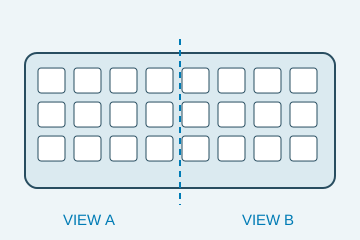
Both views cover the required key positions.
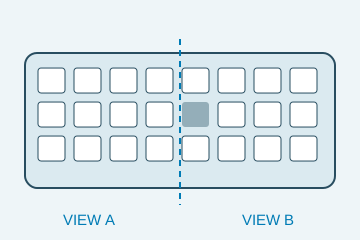
One expected position lacks its visible cap.
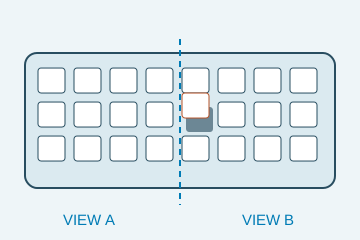
Local height differs from the permitted seating state.
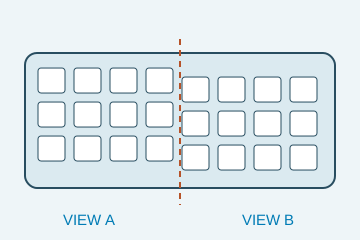
A coordinate error can create a false height step.
Select an image to view it at full size.
Separate keyboard geometry from a stitched-view error
Explore Dimensional measurement and Assembly verification to connect this inspection task with the wider station requirements.
Swipe across the table to compare all columns →
| Decision | Evidence to use | Rule to agree |
|---|---|---|
| Layout correct | Compare each expected key position. | Use the correct keyboard variant. |
| Height acceptable | Evaluate keys against appropriate local references. | Allow the designed row profile. |
| Views consistent | Validate registration and data completeness. | Hold missing or stale sensor data. |
Use overlap features to verify the merge
Calibrate both sensors into the shared reference and retain overlapping stable geometry to check registration. Different key rows can have intentionally different heights or slopes, so a single flat plane across the whole keyboard may be inappropriate. Measure the required key relationship against the design's local reference.
A single sensor may simplify association if it provides sufficient field and detail. Two sensors can extend coverage, but add synchronisation, overlap and invalid-data requirements. Compare those obligations alongside resolution. A delayed half-frame cannot be stitched to the current keyboard merely because its dimensions appear compatible.
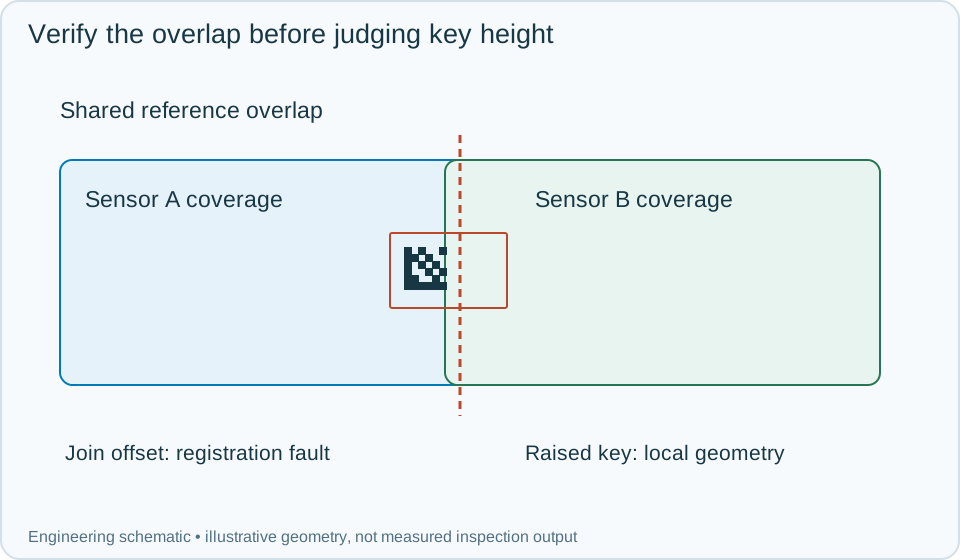
On a small screen, scroll across the diagram to inspect the labels.
Swipe across the table to compare all columns →
| Approach | Useful when | What to validate |
|---|---|---|
| Single view | Coverage and detail fit one sensor. | Check edge and sidewall visibility. |
| Two calibrated views | The required field exceeds one suitable view. | Validate the overlap and shared coordinates. |
| Vision plus functional testing | Appearance and switch function both matter. | Keep separate acceptance evidence. |
Worked example: a whole row steps up at the join
In an illustrative scan, the apparent height change follows the boundary between the sensors and also affects shared reference geometry. Investigate registration before rejecting every key in that region. Correct and validate the merge with the same reference object.
A genuinely raised key remains high relative to the proper local row reference in a valid combined scan. Record the key position and geometric evidence. If one half arrives late or is missing, keep the keyboard event incomplete and hold it for a full qualified acquisition. Reject a delayed half from the previous keyboard rather than using it to fill the gap. After authorised repair, recheck the required key relationships and retain the original and final results under the keyboard identity.
Swipe across the table to compare all columns →
| Observed evidence | Inspection decision | Action and retained record |
|---|---|---|
| A height step appears at the sensor join and also affects shared reference geometry. | Registration fault is more likely than many raised keys. | Keep both sensor views and overlap evidence, restore the common transform and repeat the identified keyboard scan before geometric acceptance. |
| One key remains high relative to its intended row after a valid merge. | Local key geometry failure. | Record key position and reference geometry, hold for the assigned repair and recheck the required key relationships under the same keyboard identity. |
| One sensor returns a delayed half from the previous keyboard. | Current acquisition incomplete; old data cannot fill it. | Reject the stale association, hold the current keyboard and acquire a complete qualified set while preserving both event identifiers. |
How should an uncertain overlap between scans be handled?
- 01Load the layoutIdentify key positions and row geometry.
- 02Acquire both viewsUse one keyboard event for both sensors.
- 03Register and inspectCheck the join and individual key states.
- 04Combine complete resultsHold incomplete coverage before release.
Trigger both views for the same keyboard and keep the recipe, scan identity and calibration version together. Do not release a combined result if one half is stale or absent. Evaluate keys against their intended positions and local references rather than flattening the whole keyboard to one common height.
Verify stitching and key defects with different challenges
Use overlap-reference checks, normal row-height variation, a raised or tilted key, sensor misregistration and deliberately interrupted acquisition. Record both sensor event IDs, transformation validity, per-key data coverage and final disposition.
Visible height and alignment do not establish key-switch electrical function or feel. Keep those tests separate, and select 3D coverage from the geometric requirements that actually need it.
Swipe across the table to compare all columns →
| Challenge | What the trial should establish |
|---|---|
| Good keyboards with designed row variation | Confirm the correct reference heights. |
| Missing and raised caps near the join | Verify both detection and stitching. |
| Dark and glossy keycaps | Check valid depth coverage. |
| Sensor dropout and repeated loading | Test stale-data handling and registration stability. |
What a stitched keyboard view cannot confirm
A software stitch can look smooth while concealing a coordinate offset. Validate the join with reference geometry and repeated loading. Vision does not establish switch operation, tactile force, travel or electrical mapping; those require their own tests even when all keycaps appear correctly fitted.
Use Vision measurement vs CMM and gauges to develop the related acceptance and integration questions for your trial.
Keyboard geometry and overlap data for a trial
Provide layouts, permitted row profiles, good and misseated keycaps, colour/material variants, reference geometry and the required electrical or functional tests as separate scope.
Use the optical and recovery challenges above when applying the architecture choices in HIKROBOT and other vision solutions comparison.
Scope and budget
Use the vision system cost guide to assess scanning, fixture control and the work needed to align several 3D views.
Testing and handover
The testing and handover process should include overlap errors and missing depth data, with functional key tests handled separately.