Application guide by addaScanCompare the inspection task, imaging conditions and validation steps with your own production line.
- Product
- Bottled beverages
- Inspection point
- Before case packing
- Checks
- Label, cap and visible product identity
The line and the inspection views
The installation view shows the bottle presentation; the two inspection views show the label and cap regions.
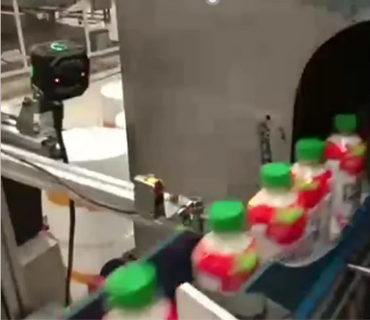
Bottles pass the inspection device on the conveyor. Product spacing and orientation determine which features are visible.
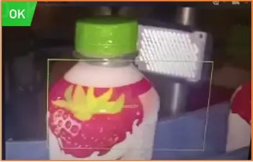
The inspection region covers the bottle label. The displayed result is OK for this captured image.
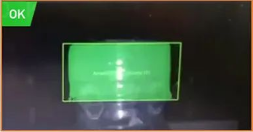
The highlighted cap region is evaluated separately from the label region.
Select an image to view it at full size.
Illustrative conditions for a line expecting Product A.
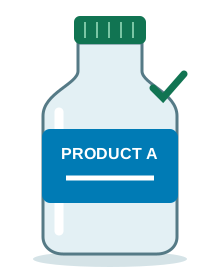 Expected
 bottle
Label present · cap present · Product A
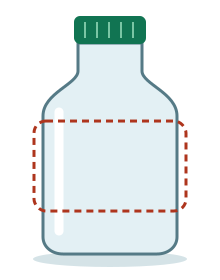 Label fault
Missing label
Cap present; label check fails.
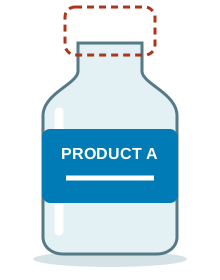 Cap fault
Missing cap
Label present; cap check fails.
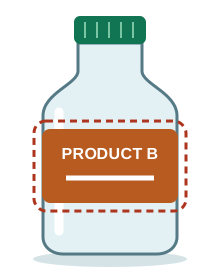 Identity mismatch
Wrong product
Label and cap present; Product B on a Product A run.
Check the label, cap and product before case packing
A finished beverage bottle can fail in several independent ways. A bottle with a cap can still have no label; a labelled bottle can still belong to the previous product run. Each question needs its own visible feature and acceptance condition.
The inspection point before case packing should expose the required features while there is still an identified hold or reject route. Select a smart camera or a multi-view system from that coverage requirement and the handling sequence.
Define the three decisions separately
Swipe across the table to compare all columns →
| Decision | What the image must show | A useful challenge |
|---|---|---|
| Label present? | The expected label area, with enough contrast against the bottle. | A bottle with the label removed, presented at different rotations. |
| Cap present? | The closure region without obstruction from guides or neighbouring bottles. | A capped bottle and an uncapped bottle in normal conveyor positions. |
| Correct product? | A visible feature that distinguishes the expected product from other permitted variants. | A different beverage with both a label and a cap. |
Presence is not identity. A label-shaped region may prove that something is attached without proving that it is the right label. Similarly coloured products may need a distinctive artwork feature, readable product text or a code compared with the approved recipe. Those additional methods must be selected from the actual samples.
Cap presence also has a limited scope. It does not establish closing torque, seal integrity or tamper-band condition. Add those as separate inspection or test requirements when they matter. The broader label verification application explains presence, position and identity checks.
Can one camera cover the label and cap?
Start with the views rather than the camera count. An image must show the closure and the distinguishing label feature at the same time. Increasing the field of view to fit the whole bottle can leave too little detail for a small printed feature. A feature on the far side of a rotating bottle is another problem: extra pixels do not make it visible.
Swipe across the table to compare all columns →
| Approach to assess | A suitable starting condition | What can change the choice |
|---|---|---|
| One view / one smart device | Both inspection regions and the identity feature are visible in a repeatable presentation. | Bottle rotation, glare or insufficient detail may require another view. |
| An additional view | The cap and label need different angles or a label face is hidden. | Results from different views must remain associated with the same bottle. |
| Multi-camera system with a controller | Several faces, additional code checks or more complex line integration are required. | Allow for synchronisation, recipe management and validation of the complete station. |
An integrated vision device is worth evaluating when the required views and tools fit the task. Compare current functions and interface requirements in the HIKROBOT smart camera selection guide. Select fixed-rule or trained tools after testing the distinguishing product features.
Make the image decision part of the line decision
Glossy labels, clear shoulders, condensation and moving bottles can change the image even when the product is acceptable. During sample work, compare lighting directions and diffusion, check the cap against its background, and test the normal range of bottle positions. Choose exposure and illumination together so the moving image still resolves the required feature. The lighting guide explains the options.
- 01Trigger & imageCapture the bottle in the defined inspection position.
- 02Check each featureEvaluate label, cap and expected product identity.
- 03Track the resultKeep the decision associated with that bottle.
- 04Hold or rejectApply the agreed action and confirm its outcome.
Keep the image decision associated with its bottle until the physical hold or reject point. A no-read, incomplete view or missing expected-product reference needs its own response and cannot inherit the previous bottle’s pass. A reject command also needs the agreed confirmation that the intended bottle was removed.
Record the individual reason as well as the overall decision: missing label, missing cap or identity mismatch. At changeover, confirm that the expected product and the inspection recipe have changed together. See PLC and reject integration and packaging changeover verification for these controls.
Validate with bottles that fail in different ways
A run of good bottles cannot show whether the system distinguishes a wrong product from an incomplete pack. Prepare controlled challenge samples for each decision, together with acceptable variation. Keep challenge bottles identified and account for them after the trial.
Swipe across the table to compare all columns →
| Sample or event | What to observe |
|---|---|
| Correct bottle across normal positions | Consistent acceptance without rejecting normal label, bottle or cap variation. |
| Missing label, cap still fitted | The label check fails independently of the cap check. |
| Missing cap, correct label fitted | The cap check fails independently of the label check. |
| Other beverage with label and cap | The identity check detects a mismatch against the active product. |
| A difficult image or interrupted result | The documented hold, reject or alarm response occurs without a stale pass. |
| Changeover and restart | Recipe selection, product tracking and physical disposition remain correct. |
Measure false rejects on acceptable bottles and missed defects on the deliberately faulty samples separately. Agree how both are calculated and what is acceptable before testing at the intended line conditions. Also witness the physical hold or reject: an accurate image classification is only one part of a working inspection station.
Worked example: a similar bottle survives the first check
In an illustrative run, a bottle from the previous product has both a label and a cap. Presence checks pass, but its distinguishing label field disagrees with the active recipe. The combined bottle result is an identity failure, with both presence results retained for diagnosis.
Track that bottle to the reject point and request removal. If reject confirmation is absent, the image classification is still correct but containment is unconfirmed. Stop or contain the affected flow under the agreed recovery procedure. Reconcile the held bottles and inspect them again where necessary; do not convert the failed event into a pass because the next bottle is correct. Store the recipe, bottle images, individual results and final handling outcome together.
Prepare a useful sample assessment
For the surrounding line, the bottling and canning guide connects product changeovers, bottle handling and the checks before packing.
Provide the bottle families and variants, approved labels, representative caps, the defects to detect and the products that could be mixed in. Include normal cosmetic variation, photos of the available installation space, bottle spacing, operating speed and details of the PLC and reject equipment.
Use the label verification SOP to define the expected identity. For a PET water line, the bottled water inspection solution shows how label checks can sit alongside fill, closure and date-code tasks. Assign each additional requirement its own evidence and acceptance rule.
Scope and budget
Use the bottled water line inspection scope and cost factors to compare shared bottle views, additional checks and reject integration; the final scope depends on your beverage formats.
Testing and handover
Include product changeovers and confirmation of rejected bottles in the testing and handover process.