Application guide by addaScanCompare the inspection task, imaging conditions and validation steps with your own production line.
- Inspection task
- Folder-gluer artwork inspection
- Decision focus
- folder-gluer artwork inspection
- Station planning
- Tie the expected artwork to the active production order
- Illustrative scenario
- old stock shares the new order's logo
Inspect carton artwork while the blank remains open
The application images show the physical product and imaging conditions. The engineering diagram below explains the inspection logic and recovery decisions.
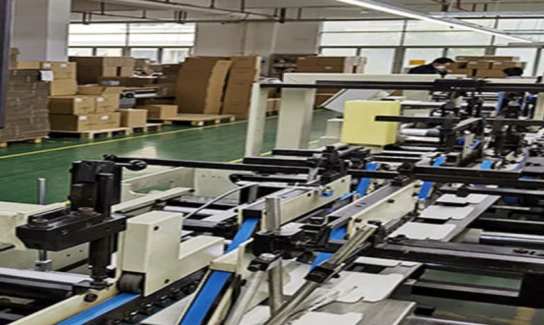
Selected installation photograph from the documented Hubei folder-gluer application. The camera checks the moving blanks for mixed artwork.
Select an image to view it at full size.
Detect the wrong carton before it becomes a closed box
Swipe across the table to compare all columns →
| Condition | Approach to evaluate | Selection check |
|---|---|---|
| Clearly different artwork | Evaluate feature or template matching. | Challenge normal print and paper variation. |
| Nearly identical variants | Check the discriminating text, symbol or code region. | Do not rely on shared branding. |
| Blank already partly folded | Review camera position and visible regions. | A hidden identifier needs a different view or process point. |
Tie the expected artwork to the active production order
Choose stable carton geometry for registration and define the visible regions that distinguish neighbouring versions. A logo match alone cannot establish the correct specification. Fixed artwork can use a controlled reference, while variable fields may need text or code verification against the order. Keep version identity separate from missing-print or print-position checks.
Place the camera before a fold hides the distinguishing panel. If the only reliable feature is on the reverse face, add a view or change the inspection point. A larger field of view can cover more panels but reduce detail in the small differentiating text. Compare those tradeoffs on the most similar carton pair, rather than on clearly different designs.
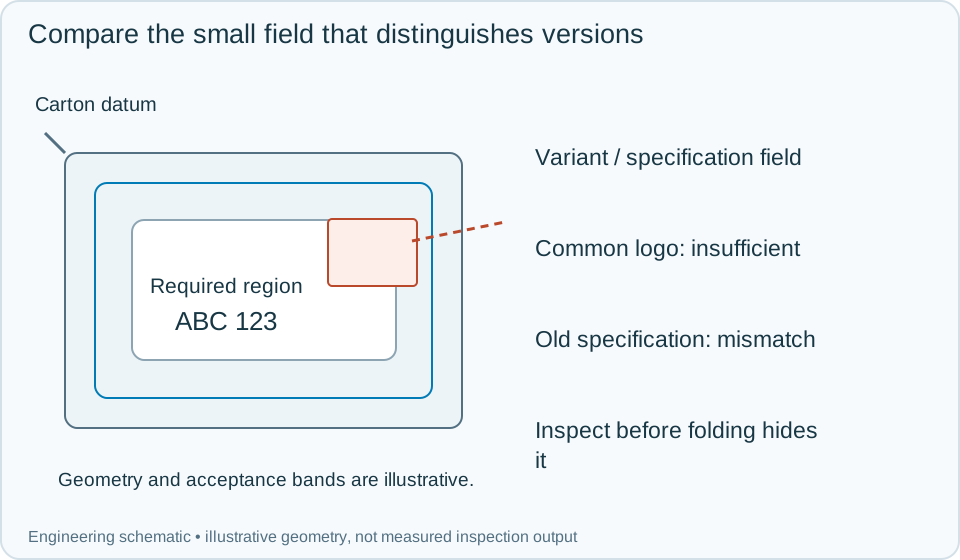
On a small screen, scroll across the diagram to inspect the labels.
Worked example: old stock shares the new order's logo
In an illustrative changeover, the new order loads its authorised artwork version and required specification field. The first carton has the correct common logo but carries the previous specification. Registration and print quality pass; version verification fails. Reject the carton and investigate residual material in the feed path instead of treating it as a weak logo match.
After clearing old stock, inspect identified first-off cartons from the new supply and confirm the recipe acknowledgement. A carton with its distinguishing field folded out of view returns unavailable identity, not acceptable identity. Keep that result separate from a confidently observed wrong version. Bind the image, expected order, observed variant and physical rejection to the carton event. If the reject actuator fails, contain subsequent flow according to the line's recovery procedure.
Swipe across the table to compare all columns →
| Observed evidence | Inspection decision | Action and retained record |
|---|---|---|
| A common logo passes but the distinguishing specification is from the previous order. | Wrong carton version. | Retain the differentiating region and active order, reject the blank and clear residual stock before qualified first-off inspection. |
| The identifying field is folded or covered before it reaches the camera. | Version evidence unavailable. | Move the inspection point or add the required view. Hold affected blanks and do not substitute a shared-logo match for identity. |
| The correct carton is presented but the inspection still expects the previous artwork. | Recipe or job synchronisation failure. | Record requested and active versions, stop normal release until acknowledged and inspect identified first-off blanks after correction. |
Verify the smallest meaningful difference
Use near-identical versions, skewed cartons, partly hidden panels and print variation that remains acceptable. Retain evidence of the distinguishing region with the full carton context. Test a stale recipe after changeover so a good image cannot conceal the wrong expected value.
A smart camera can suit a small set of stable views and rules; a more flexible system may be needed for multiple panels, complex artwork families or extensive order integration. The acceptance test remains the correct separation of similar versions under the real folding and feeding conditions.
Swipe across the table to compare all columns →
| Challenge | What to verify |
|---|---|
| Nearest-looking wrong carton | Verify that the distinguishing field causes rejection. |
| Correct blank with skew | Measure false rejects within normal transport variation. |
| Two blanks too close together | Maintain one decision per physical blank. |
| Changeover and reject delay | Confirm the reference and tracked product belong to the same job. |
Carton artwork versions and changeover data
The plastics and packaging guide connects artwork checks with converting, job changeovers and the handling of the finished carton.
Provide similar artwork variants, the smallest differing feature, machine layout, blank speed and pitch, and the required stop or reject interface.
Use the web line scan guide to develop the next step.
Define the wider inspection responsibility in label print inspection.
Develop the related acceptance requirements with folder gluer inspection.
Use the optical and recovery challenges above when applying the architecture choices in vision-system comparison guide.
Scope and budget
Compare carton presentation, artwork selection and reject tracking with the folder gluer inspection scope and cost factors.
Testing and handover
Include similar versions, a job changeover and a stop with blanks between camera and reject in the testing and handover process.