Application guide by addaScanCompare the inspection task, imaging conditions and validation steps with your own production line.
- Product
- Printed medicine cartons
- Inspection task
- Date and batch-code printing
- Decision
- Content, print condition and position
Read the characters and inspect the print
Selected details from the application images. The first and third views show cropped code lines; static field labels are translated into English.

The displayed OK example has readable printed characters and recognition overlays. This crop shows the upper code lines.
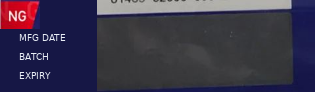
The expected variable printing is absent. A presence check must fail even before a usable character string can be compared.

This position example is marked NG. Readable digits do not establish that the print is in its permitted location.
Select an image to view it at full size.
Define the required fields before accepting the print
The manufacturing date, batch and expiry fields each need an expected format and an authorised value source. Wrong characters, missing lines, extra print, blur and misplaced printing are distinct rejection reasons. The inspection should preserve those reasons rather than reduce them all to an OCR score.
The selected images illustrate visible print conditions. Use complete carton samples to establish the permitted variation, position reference and physical handling rules; a cropped code view alone cannot validate transport alignment or reject timing.
Separate content, print condition and position
Swipe across the table to compare all columns →
| Check | Decision to define | What a read alone can miss |
|---|---|---|
| Expected content | Compare each required field with the approved value for the active job. | A clear code from the previous batch can still be wrong. |
| Print completeness | Confirm that required characters and lines are present. | A reader may return a partial string unless length and format are checked. |
| Additional or blurred print | Inspect the print area for unacceptable extra strokes, overlap or loss of legibility. | Some digits may remain readable despite extra or poor printing. |
| Position and orientation | Check the code against a permitted area anchored to the carton. | Searching a larger region may find displaced or inverted text without rejecting it. |
OCR describes what was read; the release rule decides whether it is acceptable. Depending on the task, that rule can combine an OCR string comparison, character verification, print-defect detection and geometric checks. A successful barcode decode is another result to evaluate; it does not automatically prove that the human-readable fields are correct or legible.
The OCR/OCV and date code inspection application explains these responsibilities. For this carton task, record a reason such as missing field, unexpected text, extra printing or position outside the limit, instead of reducing every fault to “OCR failed”.
Allow carton movement without allowing misplaced printing
Cartons do not necessarily reach the camera at exactly the same position or angle. First establish a repeatable reference on the carton, then assess where the variable print lies relative to that reference. The search region used to find text and the permitted region for accepting it have different purposes.
A larger search region can help locate a moving carton’s print, but accepting every result found inside that larger region can hide a printing-position fault. Conversely, fixing a narrow window in camera coordinates can reject an acceptable code simply because the whole carton moved. Challenge both cases: move a correctly printed carton, then present a carton whose print has moved relative to its artwork.
- 01Locate the cartonEstablish the product reference and compensate for permitted movement.
- 02Find and read the fieldsCollect the text and field-presence results in the search region.
- 03Verify print and positionCompare expected content and assess the allowed print area and defect limits.
- 04Track the dispositionAssociate the decision with the carton until the agreed hold or reject action.
Inverted printing needs its own rule too. Rotation-tolerant recognition may correctly read an upside-down code. If the approved packaging specification requires a particular orientation, verify that orientation separately.
Choose the inspection tools from the failure modes
Swipe across the table to compare all columns →
| Approach | Useful starting condition | Evidence needed before selection |
|---|---|---|
| OCR plus expected-string comparison | Stable, distinct characters and an available job reference. | Correct, incorrect and partial strings across normal print variation. |
| Character or print verification | A defined print style and clear acceptance rules for missing or extra strokes. | Borderline good print, missing strokes, overlap and additional characters. |
| Trained defect model with explicit release rules | Print variation is difficult to express with a small set of rules. | Representative labelled samples, a separate evaluation set and stable position/content checks. |
The application describes AI inspection on the SC5000 series, but does not disclose the exact operators, training data or thresholds. That is not enough to reproduce its configuration. Establish the smallest readable character, carton finish, print contrast and field of view before selecting a current device. The HIKROBOT smart camera selection guide separates current product families and their capabilities; a historical SC5000 reference is not a specification for every current model.
Test exposure and lighting with glossy artwork, normal carton colours and the actual moving print. A sharper static sample image does not establish moving-line performance. If the print disappears in glare, address the image before changing the classifier. Use the lighting guide to prepare that comparison.
Challenge the station with independent faults
Swipe across the table to compare all columns →
| Challenge | What to verify | Result to keep |
|---|---|---|
| Good print with normal carton movement | Accepted content and permitted print position remain stable. | False rejects on acceptable cartons. |
| Missing line or missing character | The complete required field set is enforced. | The failed field and the image. |
| Wrong but legible batch or date | The station compares with the active approved job. | Read string, expected string and mismatch reason. |
| Blurred or additional printing | Unacceptable print is rejected even when some characters can be read. | Print-defect result independently of OCR success. |
| Misplaced or inverted printing | Acceptance uses the packaging specification, not merely the search area. | Position or orientation failure. |
| Changeover, no-read or lost result | A stale pass cannot release the next carton. | Job identity and physical disposition. |
Keep challenge cartons controlled and count them back after testing. Agree the permitted print variation and the treatment of uncertain results before judging performance. A test set containing only obvious faults will not expose the boundary between acceptable faint printing and an unreadable field.
Inspect the physical outcome as well as the screen. A correct classification still needs product tracking, a defined reject or hold response and confirmation that the intended carton was removed. The PLC and reject integration guide covers that connection.
Worked example: legible print from the previous batch
In an illustrative changeover, a carton carries a clear previous batch code. Its characters and position pass, but the observed value disagrees with the newly authorised job. Hold or reject the carton for content mismatch and inspect the printer queue and residual packaging path.
After the job is corrected and old stock removed, verify the active recipe acknowledgement and inspect a new first-off carton. Preserve the old and new expected values, observed strings and final carton disposition. A no-read during this process remains unresolved; it cannot be filled with the expected batch value simply to complete the record.
What transfers to your line, and what must be established?
Verify the expected batch and date values at changeover, including acknowledgement from the active inspection recipe. Clear residual cartons and printer jobs from the previous run, then inspect identified first-off cartons before normal release.
Prepare the carton variants, approved artwork, expected field formats, normal print samples and examples of each fault. Include the printer type, product presentation, available camera space and the source of the expected batch/date values. The label verification SOP helps assign responsibility for the approved job reference and changeover checks.
This example concerns inspection of printed medicine cartons. It does not establish pharmaceutical process validation, serialisation compliance or regulatory acceptance. Those requirements belong in the project specification alongside the visual checks. If your surface is a laser-marked closure instead, compare the cap OCR and colour-changeover application: its image formation and tool choices are different.
Scope and budget
The vision system cost guide explains general imaging, handling and integration cost factors; medicine-carton inspection needs its own field rules and validation scope.
Testing and handover
Define who supplies authorised print values and who releases held cartons in the testing and handover process.