Application guide by addaScanCompare the inspection task, imaging conditions and validation steps with your own production line.
- Inspection task
- Tube-rack occupancy and cap colour
- Decision focus
- tube-rack occupancy and cap colour
- Station planning
- Use geometry for occupancy and controlled light for colour
- Illustrative scenario
- a rotated rack with one shadowed cap
Tube positions and cap colours within the rack
The application images show the physical product and imaging conditions. The engineering diagram below explains the inspection logic and recovery decisions.
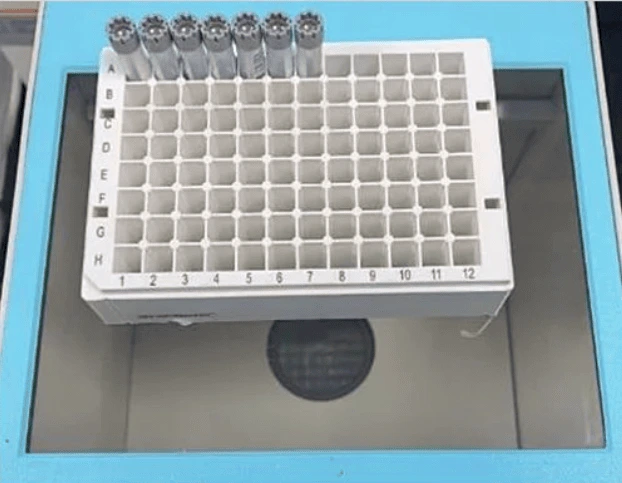
Physical rack from the application.
Select an image to view it at full size.
Map the rack before classifying tube-cap colours
Swipe across the table to compare all columns →
| Condition | Approach to evaluate | Selection check |
|---|---|---|
| Occupancy only | Evaluate position-based presence checks. | Separate empty slots from poor visibility. |
| Cap colour required | Use controlled colour imaging. | Challenge similar colours and reflective surfaces. |
| Position-dependent recipe | Compare the detected map with the intended rack layout. | Detect reversed or wrong rack orientation. |
Use geometry for occupancy and controlled light for colour
Find an asymmetric rack feature or another verified orientation reference. A symmetric grid alone may fit equally well after rotation while reversing the location labels. Evaluate tube presence from the appropriate geometric features, then assess the cap region only where a tube is present. A dark cap should not disappear simply because a brightness threshold was used as the occupancy test.
For colour, control illumination, exposure and white balance, and test approved cap batches near category boundaries. A shadow or reflective highlight can move a measured colour away from its reference. Mask these regions only when enough valid cap surface remains. If two sample types use indistinguishable caps, use a barcode or another identity source; colour is not sufficient evidence for a unique sample identity.
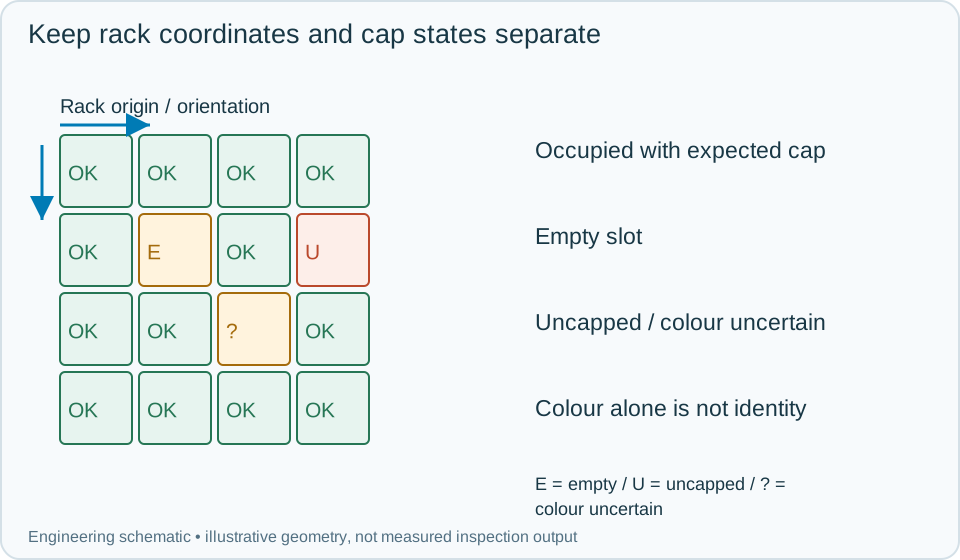
On a small screen, scroll across the diagram to inspect the labels.
Worked example: a rotated rack with one shadowed cap
In an illustrative rack inspection, the grid is detected but the orientation marker is on the opposite side from the recipe expectation. Resolve that rotation before labelling the slots. Otherwise a technically correct colour result would be assigned to the wrong sample position. Generate the row-column map from the confirmed rack reference and inspect each expected slot.
One slot is empty, another contains an uncapped tube, and a third has a cap whose valid visible region is obscured by a shadow. Output empty, uncapped and colour uncertain respectively. Reimage the shadowed slot after correcting illumination or presentation while retaining the same rack event. If it then matches the expected colour, update only that slot's inspection attempt and retain the earlier uncertainty. A wrong-colour result holds the affected position or rack according to the handling system; a rack-level pass requires every required slot to have a resolved acceptable state.
Swipe across the table to compare all columns →
| Observed evidence | Inspection decision | Action and retained record |
|---|---|---|
| The rack grid fits but its asymmetric orientation reference indicates rotation. | Coordinate labels need the verified transform. | Resolve row-column origin before attaching occupancy or colour results and retain the orientation evidence with the rack record. |
| A tube is present but its cap region is hidden by shadow or glare. | Occupancy passes; colour is uncertain. | Store the independent states, correct illumination or presentation and reimage the same rack position without overwriting the initial uncertainty. |
| The total cap count matches but one expected slot is empty and another unexpected slot is occupied. | Rack pattern mismatch despite a matching total. | Keep the position matrix, hold the rack and repeat the required checks after correction under the same rack identity. |
Record a position matrix that can be reconciled
Store the rack identity, orientation reference, expected occupancy pattern, per-slot presence and colour results, and final handling decision. A count of correctly coloured caps cannot replace this matrix because a missing tube and an extra tube elsewhere could cancel numerically.
Challenge rotated racks, edge-slot shadows, uncapped tubes, approved colour variation and physically occupied but visually obstructed slots. After a manual correction, inspect the affected rack again under a new attempt tied to its original identity. Never carry a successful slot value into the next rack just because the row-column coordinate is the same.
Swipe across the table to compare all columns →
| Challenge | What to verify |
|---|---|
| Empty and partly loaded rack | Verify position-specific occupancy. |
| Uncapped tube | Distinguish it from an absent tube where required. |
| Similar cap colours | Measure confusion under permitted illumination changes. |
| Rack turned around | Confirm the position map is corrected or rejected. |
Tube racks, cap colours and occupancy rules
Provide rack geometry, cap variants, the expected layout and the required states for absent, uncapped and uncertain positions.
Use the vision measurement vs cmm and gauges guide to develop the next step.
Develop the related acceptance requirements with assembly verification.
Define the wider inspection responsibility in presence counting.
Use the optical and recovery challenges above when applying the architecture choices in vision-system comparison guide.
Scope and budget
Use the vision system cost guide for general imaging and position-map cost factors; rack handling and application-specific validation need separate assessment.
Testing and handover
In the testing and handover process, agree distinct outputs for absent, uncapped and uncertain positions without equating cap colour with sample identity.