Application guide by addaScanCompare the inspection task, imaging conditions and validation steps with your own production line.
- Inspection task
- Milk carton case-pack counting
- Decision focus
- milk carton case-pack counting
- Station planning
- Model occupancy in the case coordinate system
- Illustrative scenario
- the detection total matches but a corner is empty
Case flaps and the carton positions they can obscure
The application images show the physical product and imaging conditions. The engineering diagram below explains the inspection logic and recovery decisions.
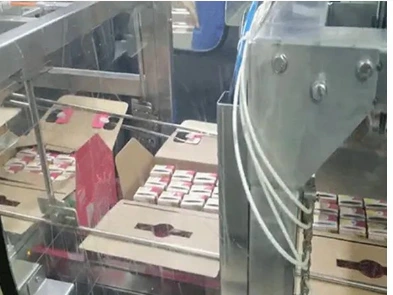
Selected installation view showing case flaps and carton presentation.
Select an image to view it at full size.
Verify every required carton position inside the case
Swipe across the table to compare all columns →
| Condition | Approach to evaluate | Selection check |
|---|---|---|
| Regular exposed loading pattern | Evaluate position-based presence checks. | Challenge shifted cartons and empty slots. |
| Tilted or partially occluded cartons | Compare trained detection with geometric checks. | Measure performance on the least visible required items. |
| Hidden contents | Change presentation or add a process check. | No model can verify an entirely unseen item from appearance alone. |
Model occupancy in the case coordinate system
Use visible case geometry to place the expected grid, allowing normal carton and case variation. Evaluate each required slot for evidence of one correctly presented carton. Distinguish a carton boundary from a printed stripe, folded flap or two surfaces of the same tilted carton.
Position the inspection before closing hides the contents. Flaps may need controlled restraint, and a deep or multi-layer pack may require checks during loading rather than a final top view. A camera cannot establish the count of fully hidden lower cartons from the visible top layer alone. Select a view and process point that expose the actual completeness requirement.
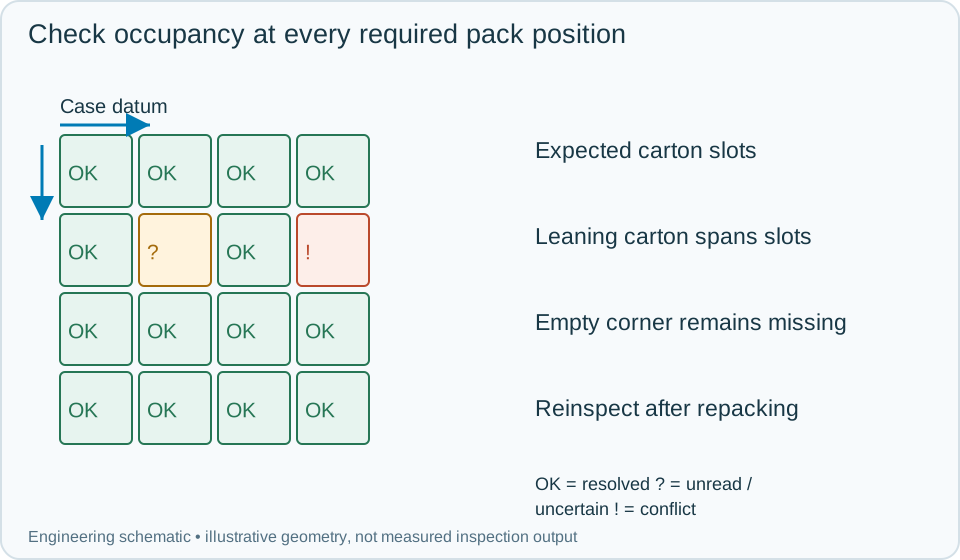
On a small screen, scroll across the diagram to inspect the labels.
Worked example: the detection total matches but a corner is empty
In an illustrative pack, one carton leans across two expected positions. The detector reports the nominal count because two visible regions on the leaning carton are treated as separate objects. The occupancy map shows one unsupported corner position and an ambiguous neighbouring region, so the case cannot pass.
Hold the case before closing and correct the packing under the agreed process. Reinspect the complete visible layout under the same case identity with a new attempt. If a flap blocks the corner, first restore visibility; do not classify the hidden position as either present or absent. Preserve the original map and image alongside the recheck and final case disposition. A correct count without a valid position map remains insufficient for release.
Swipe across the table to compare all columns →
| Observed evidence | Inspection decision | Action and retained record |
|---|---|---|
| A leaning carton produces extra detections while a required corner slot has no independent evidence. | Pack completeness fails despite a matching detection total. | Store the case-relative occupancy map, hold before closing and reinspect the required layout after authorised correction. |
| A case flap hides a required slot. | That slot is uninspected, not necessarily empty. | Restore the view or change the inspection point, keep the missing-coverage reason and do not release from the visible-slot count alone. |
| Repacking changes the contents of a previously inspected case. | Previous completeness result is no longer current. | Retain the failed image and rework event, inspect all required visible positions again and confirm the case's final disposition before closing. |
Challenge the least visible required position
Test missing cartons at corners and edges, leaning cartons, flap intrusion, changed print designs and permitted case skew. Validate whether each condition produces a specific missing, misplaced or uninspectable state.
For flexible layouts, detection or segmentation may help establish occupancy, but it still needs a recipe describing the expected pack. For a stable fixed pattern, simpler region checks may be enough. In either case, connect the final result to the correct stop, reject or rework action before the case leaves the inspection zone.
Swipe across the table to compare all columns →
| Challenge | What to verify |
|---|---|
| Each missing-carton position | Verify rejection across the whole pattern. |
| Tilt after underfilling | Ensure neighbouring cartons do not fill the missing count. |
| Flap intruding into the image | Define incomplete-view handling. |
| Wrong carton type | Separate count completeness from product identity. |
Carton layouts and short-pack examples to provide
The dairy, juice and bakery guide connects milk-carton pack patterns with product changes and case packing.
Provide the case dimensions, loading map, flap motion, carton variants and examples of every underfill pattern.
Use the plc reject integration guide to develop the next step.
Define the wider inspection responsibility in presence counting.
Develop the related acceptance requirements with multipack inspection.
Use the optical and recovery challenges above when applying the architecture choices in vision-system comparison guide.
Scope and budget
Use the multipack inspection scope and cost factors to scope carton visibility, case handling and the interface for a short pack.
Testing and handover
In the testing and handover process, test each hidden or missing position rather than treating a partial view as proof of a complete case.