Application guide by addaScanCompare the inspection task, imaging conditions and validation steps with your own production line.
- Inspection task
- Moving capsule counting
- Decision focus
- moving capsule counting
- Station planning
- Establish a track before the counting boundary
- Illustrative scenario
- one capsule pauses on the line
Capsule presentation and frame-level detections
The application images show the physical product and imaging conditions. The engineering diagram below explains the inspection logic and recovery decisions.
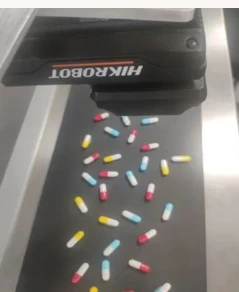
Physical capsule presentation under the camera.

Selected detection area from the original screen; cumulative count labels lie outside this detail.
Select an image to view it at full size.
Count crossing events, not repeated detections
Swipe across the table to compare all columns →
| Condition | Approach to evaluate | Selection check |
|---|---|---|
| Separated capsules with stable flow | Evaluate object detection and a crossing rule. | Check the smallest spacing between objects. |
| Touching or overlapping capsules | Assess presentation improvement or instance separation. | Measure unresolved overlaps explicitly. |
| Stops and reversals | Use event-aware tracking and reconciliation. | Prevent double counting on re-entry. |
Establish a track before the counting boundary
Place the counting line far enough inside the field of view to observe a capsule approaching it. The tracker needs sufficient visible history to distinguish one moving object from a new arrival. Keep the line away from a point where capsules routinely overlap or leave the image. If transparent capsules merge with the background, improve contrast and presentation before tuning tracking rules.
A detector identifies candidate capsules; the event logic decides whether a track has crossed from the upstream side to the downstream side. Store that crossing state separately from the current detection confidence. Where touching capsules cannot be separated reliably, mechanical spacing or another counting method may be necessary. A model that recognises capsules does not establish that it can count an unresolved cluster.
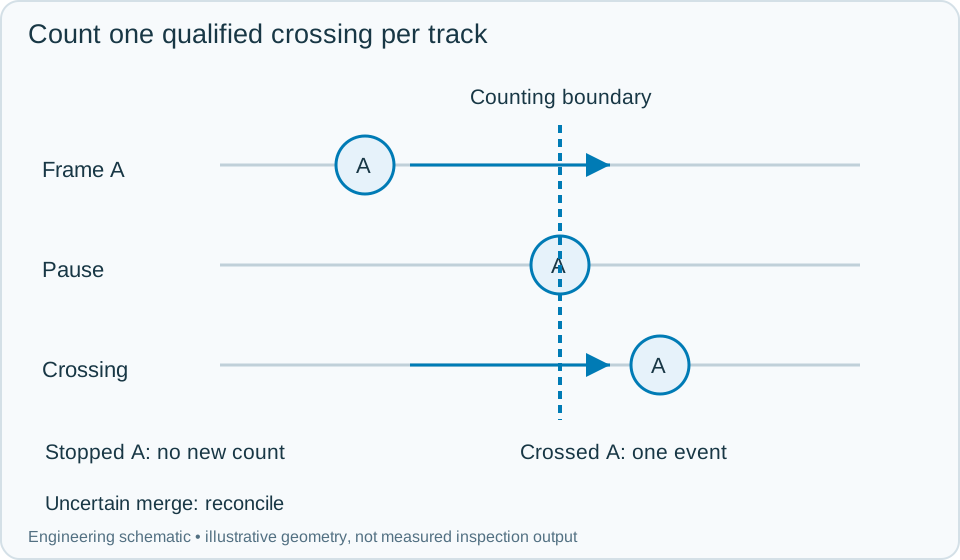
On a small screen, scroll across the diagram to inspect the labels.
Worked example: one capsule pauses on the line
In an illustrative image sequence, track A approaches, reaches the counting band and stops. Repeated frames continue to show A, but no additional count is created. Once A crosses in the accepted direction, record one crossing event. Later frames downstream of the line retain that counted status until the track leaves the monitored exit region.
If the conveyor reverses, apply the agreed business rule: either maintain a net directional count with matched reverse crossings, or stop the counting session for reconciliation. Do not erase a track simply because its speed becomes zero. If A disappears behind another capsule and reappears near the boundary, the association may be uncertain; hold the affected batch or route it to recount instead of assuming a new item. Keep the relevant frame sequence, track history and count adjustment with the batch event so an operator can explain the final total.
Swipe across the table to compare all columns →
| Observed evidence | Inspection decision | Action and retained record |
|---|---|---|
| The same tracked capsule appears in repeated frames while stopped at the counting band. | No new object and no additional crossing event. | Preserve its track and counted state, resume the qualified direction rule when movement continues and retain the frame history for reconciliation. |
| Two touching capsules merge and reappear near the count boundary with uncertain identities. | Crossing quantity unresolved. | Flag the affected batch interval, use the agreed separation or recount process and preserve any authorised correction separately from confirmed automatic counts. |
| The controller restarts with capsules still in the monitored zone and unfinished tracks are lost. | Automatic continuation cannot assume the old object state. | Preserve confirmed totals, reconcile or clear the physical zone and resume only after the batch boundary and count state are established. |
Recover a stopped line without silently resetting the batch
A restart must preserve confirmed counts and distinguish them from unfinished tracks. If the camera or controller loses the state needed to resume, clear or reconcile the physical counting zone before restarting the batch. Resetting the counter while capsules remain in view can create either duplicate or missing events.
Validate close pairs, touching capsules, pauses on either side of the line, reverse movement and exit followed by re-entry. Compare the event log against an independently established batch quantity. Report uncertain crossings separately from confirmed counts, and require a documented correction when a manual recount changes the batch total.
Swipe across the table to compare all columns →
| Challenge | What to verify |
|---|---|
| Known physical batch | Compare the reported total with the actual quantity. |
| Touching capsules | Check missed and merged detections. |
| Stop, reverse and restart | Verify the same item is not counted twice. |
| Mixed colours | Validate each required category independently. |
Capsule flow and stop-start conditions to test
Provide capsule variants, the counting objective, motion behaviour, overlap examples and a physically verified test quantity.
Use the plc reject integration guide to develop the next step.
Define the wider inspection responsibility in presence counting.
Translate these view and interface requirements into equipment choices with smart camera selection.
Use the optical and recovery challenges above when applying the architecture choices in vision-system comparison guide.
Scope and budget
The vision system cost guide provides general counting-station cost factors; capsule handling, reference counts and application requirements need their own scope.
Testing and handover
Use the testing and handover process to test overlap, stops and restarts against a physically verified reference count.