Application guide by addaScanCompare the inspection task, imaging conditions and validation steps with your own production line.
- Inspection task
- Reading 64 battery codes in a tray
- Decision focus
- reading 64 battery codes in a tray
- Station planning
- Define the tray boundary before accumulating reads
- Illustrative scenario
- supplement the missing position safely
Individual code regions across a 64-cell tray
The application images show the physical product and imaging conditions. The engineering diagram below explains the inspection logic and recovery decisions.
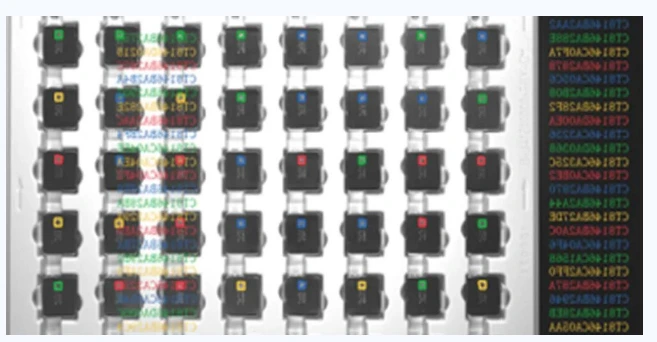
Original multi-code result view for the battery tray.
Select an image to view it at full size.
A total of 64 reads does not prove a correct tray
Swipe across the table to compare all columns →
| Condition | Approach to evaluate | Selection check |
|---|---|---|
| One fixed wide view | Evaluate code detail across every tray position. | Include the worst corner and reflective cell. |
| Several cameras | Compare coverage and shared tray-event handling. | Avoid double counting overlapping views. |
| Manual recovery | Use position-specific exceptions and controlled retries. | Reconcile the completed set before release. |
Define the tray boundary before accumulating reads
Locate the tray, determine its orientation and assign each code candidate to a valid cell region. Exclude codes outside that boundary. A wide field of view must still retain adequate module detail at the corners and across the permitted cell heights. Multiple views or staged reads can recover missing detail, but they introduce a need to merge results under the same tray event.
For HIKROBOT and alternative readers, compare corner readability, position output and duplicate handling as well as the nominal number of symbols supported. A reader that returns strings without usable locations may require a different station arrangement to establish per-cell identity. Increasing the allowed code count cannot fix a wrong tray boundary or prove which cell supplied a string.
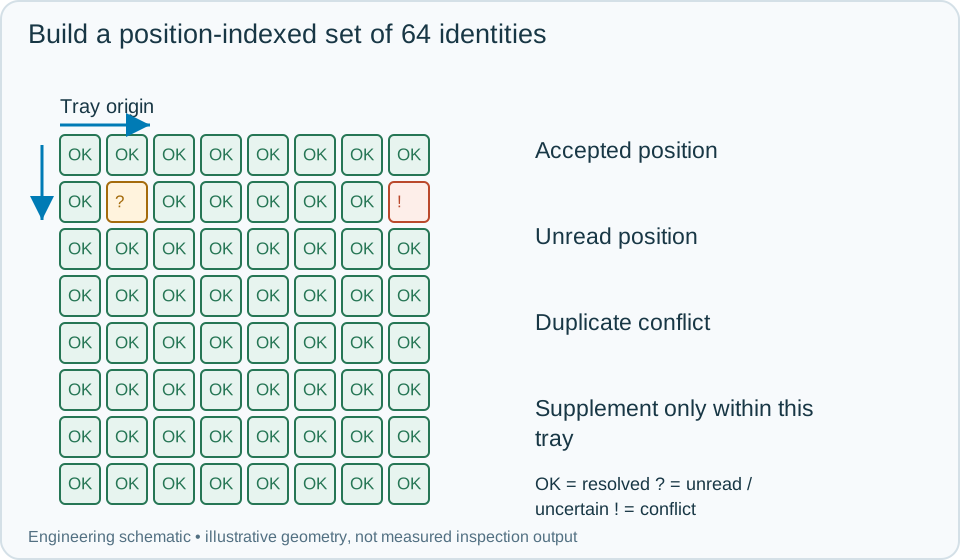
On a small screen, scroll across the diagram to inspect the labels.
Worked example: supplement the missing position safely
In an illustrative first acquisition, one position is unread and another code appears twice. The station has not established a complete unique set, even if its raw decoder output contains 64 entries. Retain the valid position assignments, flag the duplicate conflict and request a controlled reread of unresolved regions while the tray remains fixed.
A supplemental image resolves the unread position. Merge it only if its tray event and coordinate transform match the first acquisition. If the duplicate code persists at two occupied positions, hold the tray for identity reconciliation; do not delete one occurrence merely to make the list unique. Once every required position has one accepted identity and uniqueness rules pass, submit the complete set and wait for the required acknowledgement. On tray removal, close the event. A late supplemental result from that tray cannot populate an empty position in the next tray's set.
Swipe across the table to compare all columns →
| Observed evidence | Inspection decision | Action and retained record |
|---|---|---|
| The raw result has 64 strings but includes a repeated identity and an unresolved position. | The required unique position-indexed set is incomplete. | Hold the tray, retain the exception map and target supplemental images at unresolved regions without discarding evidence of duplicates. |
| A supplemental read resolves one missing slot with a valid transform under the same tray event. | Merge that position, then re-evaluate the complete set. | Preserve the initial and supplemental attempts, rerun uniqueness and binding rules and wait for the required complete-set acknowledgement. |
| A tray is replaced while a supplemental acquisition or response is pending. | The old result cannot populate the new tray. | Close the earlier event, clear the new position map and preserve stale responses against their original tray for reconciliation. |
Validate set integrity as well as optical coverage
Use deliberate missing codes, duplicate identities, rotated trays, a visible neighbouring tray and delayed supplemental frames. Inspect the stored position matrix and the actual release signal for each challenge. A complete read should be repeatable without changing the ordering or quietly substituting a neighbouring symbol.
Retain the initial and supplemental images, per-position attempts, conflict reasons, final set and tray-level disposition. If an operator replaces a cell, invalidate that position's previous identity and repeat the required uniqueness and binding checks. Preserve the replacement history so a later manufacturing query can reconstruct which cell was actually released.
Swipe across the table to compare all columns →
| Challenge | What to verify |
|---|---|
| One unreadable code among the rest | Keep the tray incomplete and identify its position. |
| Duplicate code values | Apply the uniqueness rule explicitly. |
| Tray outside the marked loading area | Reject incomplete coverage. |
| Operator replaces tray during retry | Reset the acquisition event and accumulated data. |
Tray maps, code samples and completion rules
Provide the full tray, code dimensions, position map, uniqueness rules and the warehouse transaction interface.
Use the barcode verification grading guide to develop the next step.
Translate these view and interface requirements into equipment choices with code reader selection.
Define the wider inspection responsibility in dpm code reading.
Use the optical and recovery challenges above when applying the architecture choices in vision-system comparison guide.
Scope and budget
The vision system cost guide helps scope full-tray coverage, position mapping and the warehouse transaction interface.
Testing and handover
Use the testing and handover process to test an incomplete set, duplicate codes and a tray change during acquisition before acknowledging receipt.