Application guide by addaScanCompare the inspection task, imaging conditions and validation steps with your own production line.
- Inspection task
- Milk packaging print-defect inspection
- Decision focus
- milk packaging print-defect inspection
- Station planning
- Locate the package before assessing the date region
- Illustrative scenario
- a new date is rejected after changeover
Printed strokes and the model’s probability map
The application images show the physical product and imaging conditions. The engineering diagram below explains the inspection logic and recovery decisions.
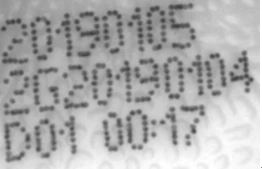
Numeric and Latin-character detail from the original milk-package print. Chinese field prefixes are outside this crop; the captured code has not been redrawn.

Original model probability image from the accepted-print example; the near-dark region is a model output, not the photographed bottle.
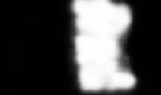
Original model probability image from the defective-print example. The bright response is evaluated using area and threshold rules.
Select an image to view it at full size.
Separate the wrong date from a defective date print
Swipe across the table to compare all columns →
| Condition | Approach to evaluate | Selection check |
|---|---|---|
| Correct date required | OCR plus approved-job comparison. | Include legible wrong dates in the test. |
| Smear or missing strokes | Localised print-defect inspection. | Include borderline acceptable printing. |
| Variable background and text | Compare trained defect detection with rule-based verification. | Separate training and evaluation samples by production variation. |
Locate the package before assessing the date region
Use a stable package feature to position the inspection window, allowing the agreed transport variation without allowing print displacement. Confirm that the whole date region lies within the crop before running defect or OCR tools. A crop that removes the final digit can look like missing ink even when the original full image contains complete printing.
A trained appearance tool can help with variable backgrounds or irregular missing strokes, but its normal examples must cover legitimate date changes. Character recognition or verification supplies a different constraint: matching the observed text to the current recipe. Neither tool should use the expected date to manufacture an unreadable character. Keep a separate low-confidence or unavailable result when the image cannot support the decision.
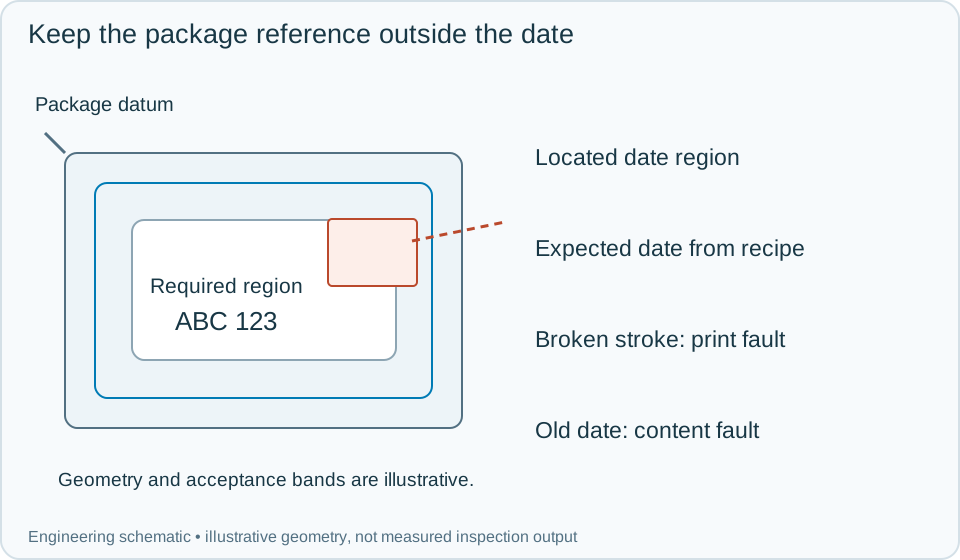
On a small screen, scroll across the diagram to inspect the labels.
Worked example: a new date is rejected after changeover
Consider an illustrative run where correctly printed new digits are repeatedly flagged as unusual. Inspect the full image and located crop first. If the crop is complete and sharp, compare the rejected shape with the model's approved normal variation. The new character combination may be unfamiliar; validate any model update against genuine missing-stroke samples before returning it to production.
Now present a perfectly printed previous date. Appearance can pass while content verification fails, requiring segregation of that pack. Present a current date with a broken stroke: OCR may still return the right string, but print completeness fails independently. Record the actual string, expected recipe value, local defect evidence and final action for each pack. Recheck corrected printing under a new event; do not overwrite a rejected image with the next good pack's result.
Swipe across the table to compare all columns →
| Observed evidence | Inspection decision | Action and retained record |
|---|---|---|
| The current date is sharp and complete but a new digit pattern triggers the appearance model. | Possible normal-variation gap; do not change content rules. | Review the identified sample and model version. Validate any update against old normal samples and actual missing strokes before deployment. |
| A clearly printed previous date passes the appearance check. | Content mismatch independent of visual print condition. | Retain expected and observed strings, hold the pack and reconcile the active printer job and inspection recipe before first-off verification. |
| The cropped image loses a character visible in the full frame. | Invalid region extraction; defect result is not trustworthy. | Store full and cropped views with the locating transform. Correct the crop and reinspect the same identified pack. |
Keep model maintenance separate from recipe maintenance
A date rollover should update the authorised expected value without silently changing appearance tolerances. Changes to packaging artwork, background colour or print method require an image and model assessment of their own. Test positional drift, incomplete crops, normal new digits and real defects together.
Store the model version alongside the recipe and images. If a false reject begins after a change, these records show whether the cause was localisation, recognition or defect classification. Vision can identify the visible print condition; it does not by itself establish the correctness of upstream production records.
Swipe across the table to compare all columns →
| Challenge | What to verify |
|---|---|
| New date combinations | Accept normal changes without retraining on every test image. |
| Smears and missing strokes | Record missed defects separately from false rejects. |
| Position and brightness variation | Verify the crop remains aligned and complete. |
| Wrong but clean date | Confirm the independent expected-value rule. |
Milk packs and print faults to include in a trial
For production context, the dairy, juice and bakery guide connects print verification with pack changes and the inspection points around filling and packing.
Collect good and faulty print across dates, print heads and packaging batches; supply approved content rules and the moving-line imaging conditions.
Use the why wrong expiry dates leave the line guide to develop the next step.
Define the wider inspection responsibility in ocr ocv code inspection.
Develop the related acceptance requirements with food packaging artwork verification.
Use the optical and recovery challenges above when applying the architecture choices in vision-system comparison guide.
Scope and budget
Compare print coverage, approved artwork data and format changeovers using the food packaging artwork verification scope and cost factors.
Testing and handover
Record smears, missing fields and wrong expected values as separate challenges in the testing and handover process.
For food packs sold in South Africa, check the expected date wording against the approved product specification. The best-before and use-by guide explains the distinction; readable digits alone do not verify the required date type.